Thursday, August 6, 2020

How to Create the purchasing Group in the SAP

A Purchasing Group is an organizational unit or an individual buyer who are responsible for procurement of material or service for day to day activities. Purchasing group can be a group of employees who are responsible to purchase group of materials can be defined as purchase group.

Path to Create Purchasing Group

IMG ⇒ Materials Management ⇒ Purchasing ⇒ Create Purchasing Group
TCode: OME4

Step 1:- Select Maintain Purchasing Group execute icon, by following the above path.
Step 2 − Click the New Entries icon given below.


Step 3 − Enter the name of the purchase group along with its description
Step 4 − Click the Save icon after entered the required information.A new Purchasing Group will be created.

Wednesday, August 5, 2020

How to Create the Purchase Organization in the SAP

Purchasing Organization:-

The purchasing organization is an organizational unit which procures articles and negotiates general purchase price conditions with vendors. It is responsible for all purchasing transactions in the company.A purchasing transaction is processed completely by one single purchasing organization.

Path to Create Purchasing Organization:-

IMG ⇒ Enterprise Structure ⇒ Definition ⇒ Materials Management ⇒ Maintain Purchasing Organization

TCode: OX08

Step:- 1 select Maintain Purchasing Organization execute icon, by following the above path.

Step:- 2 Click the New Entries icon given below screenshot.


Step:- 3 Fill the name of the purchasing organization along with its description.


Step:- 4 Click the Save icon & a new Purchasing Organization will be created.


Tuesday, August 4, 2020

How to Create the Storage Location in the SAP

Storage Location:-

Storage Location is an organizational unit, which actually differentiates between the different material stocks in a Plant. Storage location is a place where stock is kept physicall.
A plant can consists  of multiple locations.All data is stored at a storage location level for a particular storage location.Follow the steps given below to create a Storage Location in the SAP.

Path to Create Storage Location

IMG ⇒ Enterprise Structure ⇒ Definition ⇒ Materials Management ⇒ Maintain Storage Location

TCode: OX09

Step 1:- After the following above path click the Maintain storage location.


Step 2:-Enter the name of the plant for which you want to create the storage location.


Step 3:- Click the New Entries


Step 4:- Enter the name of the storage location along with its description.Click the Save icon after filling the required information. A new Storage Location will be created.

Saturday, August 1, 2020

How to Create Plant in the SAP


Create Plant in the SAP:-

Plant is an organizational unit within a company where activities take place. A plant will produce goods and make goods available for the company.
It is a unit having manufacturing facility, warehouse distribution center, or a regional sales office within logistic.

Path to create Plant:-

SPRO-(IMG) ⇒ Enterprise Structure ⇒ Definition ⇒ Logistic General ⇒ Define, Copy, Delete check plant.


Step1:-select Define, Copy, Delete check plant execute icon, by following the above path.

Select Define Plant icon to create a new plant.

Step2:-Click the New Entries button.


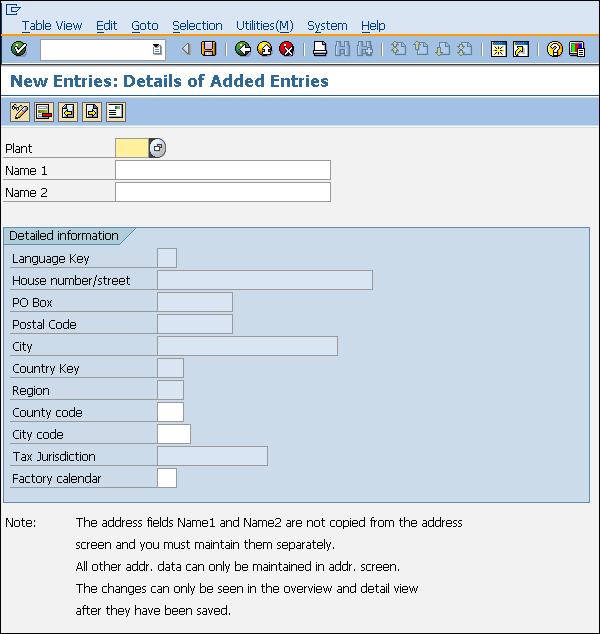
Step 3:- Fill in all necessary details like plant name along with detailed information like Language, House no., city, country, region, postal code.


Step 4:-Click the Save icon after filling the required details.A new plant will be created.


Thursday, July 23, 2020

How to create the company code Organization structure in the SAP in simple easy steps


Menu path to
 Create Company :-


Path to create the company code in the sap step by step:-

IMG ⇒ Enterprise Structure ⇒ Definition ⇒ Financial Accounting ⇒ Define Company

TCode: OX15


Step-1 Type SPRO 


Step-2 Click on the Highlighted SAP Reference IMG


Step-3 Click on enterprise structure and then Click on financial accounting.


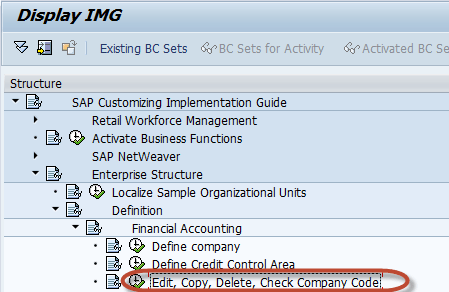
Step- 4 Click on the Edit, Copy,Delete, Check Company Code

How to Create a Company in SAP & Assign Company Code

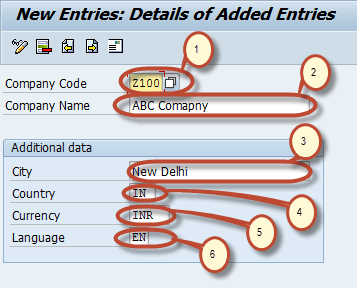
Step- 5 Enter the below given fields.

Easy maintanance of company code parameters | SAP Blogs

Step- 6 Fill the basic details given below 

How to Create a Company in SAP & Assign Company Code


After the following steps to filled and saved.

Wednesday, July 15, 2020

What is the Procurement Process and procedure in the SAP


SAP MM - Procurement Process


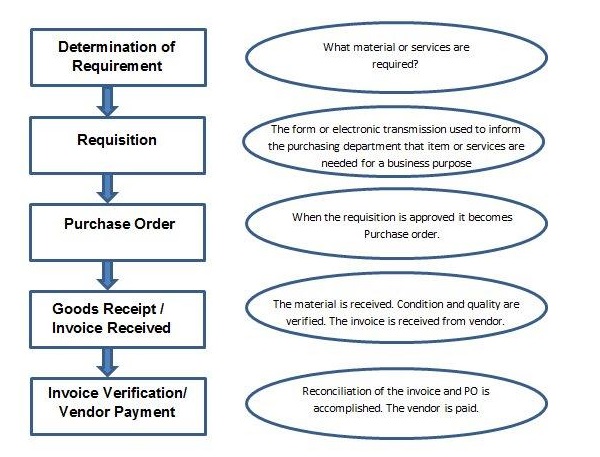
The process of buying materials and obtaining services from vendors or dealers is called procurement.It is subdivided into following parts −

  • Basic Procurement
  • Special Procurement

  • Basic procurement is a process of acquiring goods or services in the right quantity, at the right price, and at the right time. However it is critical to maintain a right balance between quantity, price, and time

Structure of the Procurement Type:-

SAP Basic Procurement


Sr.No.Procurement Activities & Description
1

Determination of requirement

It is the logical subdivision where it is determined what material or services are required, and which supplier can fulfill the requirements.

2

Creating Purchase Requisition

It is the phase in which the purchasing department is informed about the requirement of items or services. A requisition is an internal document.

3

Creating Purchase Order

It is the phase when an order is created from requisition and it is approved and assigned to a supplier.

4

Goods receipt/ Invoice Received

It is the phase in which the material is received by the company and its condition and quality are being inspected. In this phase, an invoice is received from the vendor (seller).

5

Invoice verification/ Vendor Payment

It is the phase in which the vendor (seller) is paid from the company and reconciliation of the invoice and PO is accomplished.


Friday, July 3, 2020

SAP Overview & which type of looks SAP

दोस्तों आज हम SAP के ऐसे मॉडुल के बारे में बात करेंगे जो आपको इक अच्छा प्रोफेशनल इंसान बना देगा। तो दोस्तों आइये सीखते है सैप MM मॉडुल क्या होता है

और दीखता कैसे है 


 SAP में MM ही इक ऐसा मॉडुल है जो material master  और Inventory Management  में डील करता है 

SAP MM खरीद और सामग्री प्रबंधन गतिविधियों को गति देता है, जिससे व्यवसाय पूरे समय और लागत दक्षता के साथ सुचारू रूप से चलता है

Login Screen

Toolbar Icon


Exit Keys

Log Off


How to extend the material storage location in the mass

                      Path Extend the storage location in Mass in the SAP:-           Step 1:- Use Transaction code= MMSC_MASS  and execute....